- Knowledge Transfer · Microsoft 365
Automated handoff reports
from your M365 data.When someone leaves or a role transitions—capture what they actually did, who they worked with, and what needs to be handed off.
- Mail headers, calendar, Teams, SharePoint, OneDrive — metadata only
- AI-generated frameworks: handoff plans, successor plans, job descriptions
- Transfer™ adds optional Azure DevOps (repos, pipelines, work items)
No exit interviews. No scrambling. Traceable evidence from Microsoft 365.
RolePrint Transfer™ — How it works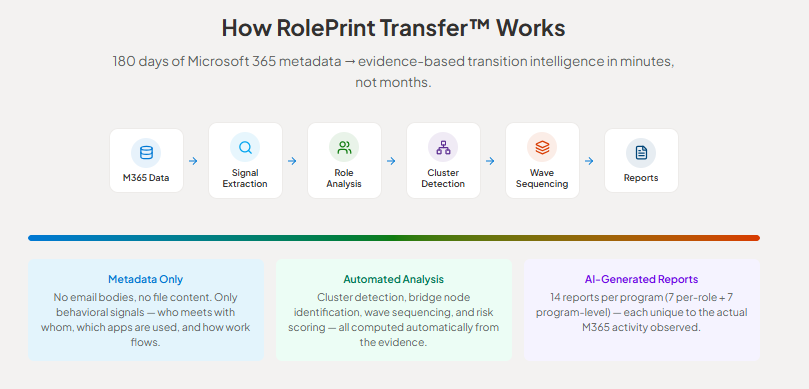
- RolePrint Exit™
When your best people leave—
what did they actually do?RolePrint Exit™ analyzes 180 days of M365 activity and turns it into seven evidence-based handoff reports within minutes.
- M365 evidence: who they worked with, systems they used, meeting commitments
- 30-60-90 Day Successor Plan from real work patterns
- Security & compliance evidence for HR and Legal review
Knowledge preserved. Legal evidence ready. No exit interviews.
Wave Transition Plan — Traxler Industries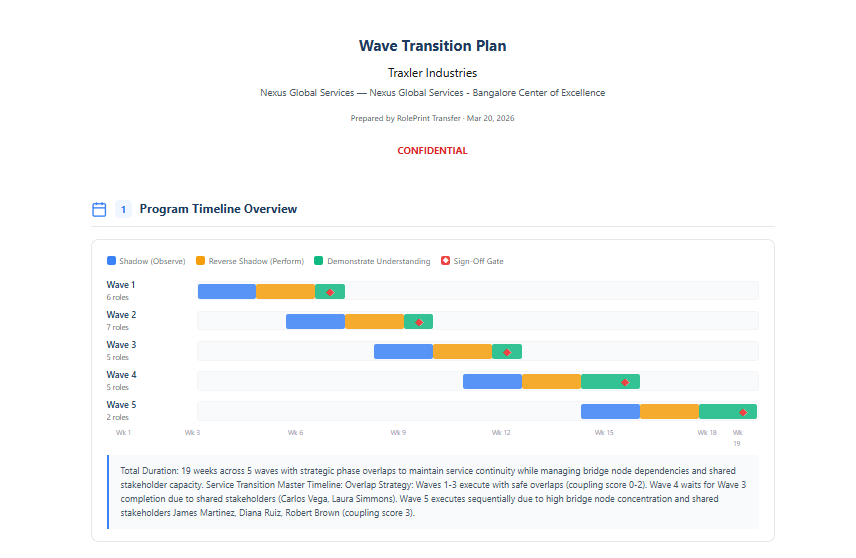
- RolePrint Transfer™
Built for outsourcing.
M365 + Azure DevOps.Program-level analysis: add roles, connect Microsoft 365 and optional Azure DevOps. Get per-role and program reports, wave plans, TCI, and dependency mapping from real activity.
- 7 per-role + 7 program reports — Transfer Playbook, SOW, Wave Plan, Dependencies
- Transfer Complexity Index (TCI), clusters, bridge nodes, wave sequencing
- Vendor Portal, Contract Review, Compliance, AI assistant included
No surprises. No scope creep. Scope and sequencing from facts.
RolePrint Transfer™ — Live Progress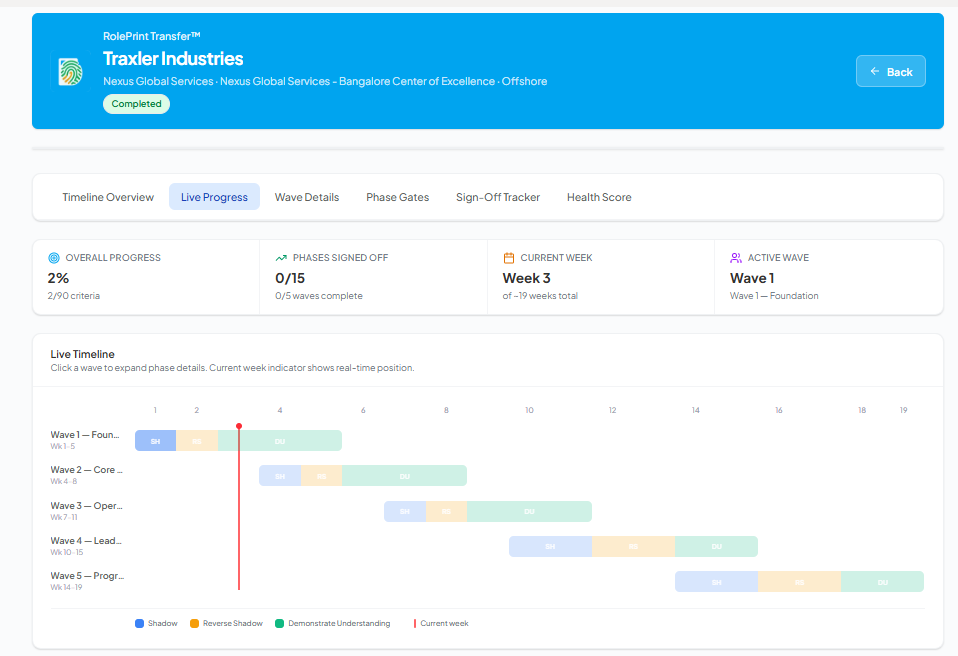
- Wave design · Transfer
Waves sequenced
from real dependencies.Roles are grouped into sequential waves using collaboration signals, cluster integrity, bridge nodes, and program constraints—not spreadsheet guesswork.
- Per-wave role rosters and systems footprint in one view
- Timeline from week zero through program closeout
- Gate criteria before the next wave proceeds—documented in the product
Phase gates between waves keep each handoff auditable and traceable.
Waves & Transition Sequencing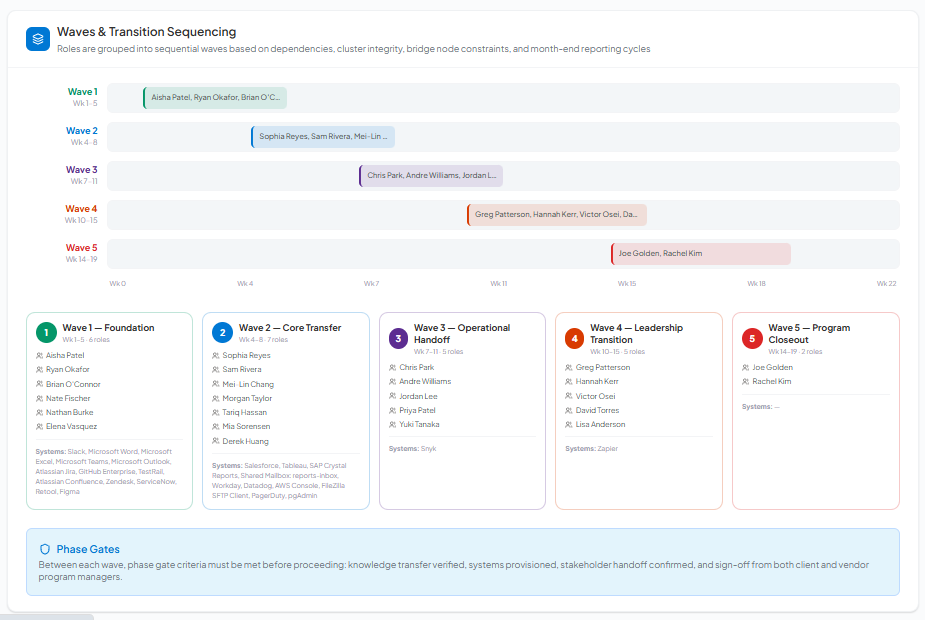
Two solutions
One platform for role transitions
Exit for departures. Transfer for outsourcing. Both driven by evidence from your Microsoft 365—not guesswork.
RolePrint Exit™
Capture knowledge before they leave
Analyzes 180 days of Microsoft 365 activity—mail headers, calendar, Teams, SharePoint, OneDrive—and turns it into evidence-based handoff reports. HR and Legal get the full picture of what they did and what the successor needs.
No exit interviews. No guessing. Just facts from their M365 data.
RolePrint Transfer™
For outsourcing and role transitions
Runs at program level: add roles, connect M365 (and optional Azure DevOps), run analysis, and get per-role and program-level reports. Wave planning, TCI, clusters, and bridge nodes guide sequencing—based on real work.
Scope and sequencing based on facts—not guesswork.
Patent-pending · Microsoft 365 required · Azure DevOps optional (Transfer) · Delivered within minutes
Calculate Your Savings
Don't know? Average is 10–15%.
Based on research from SHRM, Gallup, and the Center for American Progress
The problem
Every role transition is a knowledge risk
Most organisations rely on exit interviews and manual handoffs — and lose critical institutional knowledge when people leave or roles move offshore.
Knowledge walks out the door
Someone leaves and no one knows what they actually did — what systems they used, who they worked with, or what commitments they made.
Offshore teams start from scratch
A role moves offshore and the new team inherits a blank page. Without evidence of what the role did, scope is guesswork and go-live risk is high.
Exit interviews are never enough
Tribal knowledge, rushed checklists, and anecdotal handoffs can't produce the structured evidence HR, Legal, and successors need.
The answer
Evidence from your Microsoft 365—automatically.
How it works
Works like a Microsoft 365 app
One click to run analysis. RolePrint™ collects evidence, builds frameworks, and delivers professional reports — no interviews, no guesswork, within minutes.
Feels like software you already use
RolePrint™ is built for Microsoft 365 environments. Your IT admin approves read-only access; HR and managers get a clean, familiar interface. No training required.
Connect Microsoft 365
One-time setup — your IT admin approves read-only M365 access in about five minutes. RolePrint Transfer™ optionally adds Azure DevOps (repos, pipelines, work items) for engineering scope.
Select employee or program
Exit: enter their email and date range. Transfer: create a program, add roles by email. One minute. No forms, no interviews.
Click Analyze
RolePrint™ pulls 180 days of M365 activity — mail headers, calendar, Teams, SharePoint, OneDrive — and for Transfer, optional Azure DevOps data. AI builds frameworks from that evidence. No guesses.
Download your reports
Exit: 7 reports (successor plan, job description, handoff guide, executive brief, systems, security evidence). Transfer: 7 per-role + 7 program reports. Professional PDFs. Within minutes.
Why generic AI tools can't do this
Copilots and chat AI generate text — they don't analyze multi-person M365 activity, build evidence trails, or produce structured governance reports.
Generic AI tools
Copilot, ChatGPT, etc.- ✕Can't analyze multiple people's M365 activity
- ✕Can't create cross-user collaboration reports
- ✕Can't audit permissions or surface security gaps
- ✕Not designed for structured handoff governance
Why it matters
- ✓Real data from M365 — handoffs that don't fail or miss critical context
- ✓HR and Legal need evidence they can point back to and verify
- ✓On-demand access before data is gone beats cleaning up after
- ✓Structured, traceable reports your team can act on the same day
Capability
Generic AI Tools
Copilot, ChatGPT, etc.
RolePrint™
Evidence from real M365 data
Analyze 180 days of real work
Copilots can't analyze multiple people's M365 activity across workloads—no cross-user evidence trail.
Activity analysis from M365 metadata—up to 180 days of activity to show how work actually happened.
Clear, traceable evidence
Copilots can't create cross-user reports (who worked with whom) or audit permissions for Legal.
Facts from M365 data — every finding ties back to what they actually did. Verify in one click.
Post-exit, on-demand only
Copilots are reactive, not proactive for transitions — not designed for limited, on-demand access.
You run analysis when you need it. Role-based access, retention settings, full audit log.
Dependency mapping across workloads
Copilots can't map M365 dependencies across users to identify security gaps or cluster analysis.
Exit: maps files, sites, tools, stakeholders. Transfer: cross-role dependencies, clusters, bridge nodes, wave sequencing.
Azure DevOps integration (Transfer)
Copilots can't pull Azure DevOps repos, pipelines, or work items into transition scope or risk.
Transfer™ connects to Azure DevOps: read-only. Repos, pipelines, work items enrich TCI and program reports.
Reports HR and Legal actually use
Copilots produce generic summaries — inconsistent, not structured for governance or handoff.
7 per-role + 7 program reports. Successor Plan, SOW, Wave Plan, Dependencies, Security Evidence. No prompt engineering.
180-day pattern detection
Copilots can't connect patterns across large activity volumes without heavy manual work.
180 days analyzed. Patterns and single points of failure surfaced. Delivered within minutes.
Built for enterprise compliance
Data from your Microsoft 365 — pulled securely via Microsoft Graph. Metadata only. No email bodies, chat content, or file interiors.
Post-activity only
Not employee monitoring. Analysis runs after someone leaves or during a planned transition — never on active, unsanctioned employees.
Read-only access
We never modify or delete your data. RolePrint™ analyzes evidence without writing back to your M365 — zero footprint.
Metadata only — no content
We never read email body, chat content, or file interiors. Mail headers, calendar signals, Teams activity, and SharePoint access patterns only. Transfer optionally adds Azure DevOps (read-only, PAT-based).
Admin-controlled
Only IT admins can authorize access and run analyses. Tenant-scoped permissions; your team decides who can use RolePrint™.
Full audit trail
Every access, report, and key action is logged and available for security team review. Traceability is built in, not bolted on.
For security teams
Security Review Packet
Architecture diagrams, data flow maps, permissions model, and FAQ — packaged for your IT security review.
Complies with GDPR Art. 13/14 transparency obligations. Metadata only — no email bodies, chat content, or file interiors accessed. Advanced risk detection requires Microsoft 365 E5 + Purview.
Prove handoff in two weeks
RolePrint™ uses your Microsoft 365 to capture what roles actually do — for departures and outsourcing. Two weeks, three cases, reports within minutes. Secure and easy to understand.
What you'll receive
Guided M365 setup
Partner with your IT team to configure access and safeguards the right way — without disrupting operations.
Security & compliance review
Architecture docs, data flow maps, and permissions model for your security reviewers so approvals don't stall.
M365 evidence + AI frameworks
Evidence reports (systems, collaboration, meeting load) and AI-generated handoff frameworks — customizable for your organisation.
Stakeholder readouts
Structured readouts for HR, managers, and compliance. Your team learns how to operationalise the outputs.
2-week timeline
Days 1–3
Access and guardrails
Identity integration and security review with your IT team. Clear boundaries from day one.
Days 4–7
First case — reports within minutes
Run your first analysis. Get M365 evidence and AI-generated frameworks for HR, Legal, and the successor or offshore team.
Days 8–12
Repeat and compare
Two more analyses. See patterns, fragility, and handoff gaps across roles — not anecdotes.
Days 13–14
Executive decision
Results review, value summary, and rollout plan — or a clean exit if it's not a fit.
Don't let the playbook walk out the door.
Two weeks. Three cases. M365 evidence + AI frameworks within minutes. See sample reports and talk to us.
Frequently asked questions
Honest answers about M365 evidence, AI frameworks, and how RolePrint™ works.
More questions?
View full FAQ